All about Mobile, Web, Technology, Politics, Security, E-Commerce and Living in the Philippines.

Showing posts with label SMS. Show all posts

Monday, April 26, 2010

SMART epic failed my Boobquake sms subscription


"After prominent Iranian cleric Kazem Sedighi said that women’s immodesty increases earthquakes, a Purdue University student named Jen McCreight created a Facebook event called “Boobquake,” calling for the women of the world to wear their most revealing outfits on Monday, April 26.
Sedighi was quoted in the Chicago Tribune saying, “Many women who do not dress modestly … lead young men astray, corrupt their chastity and spread adultery in society, which (consequently) increases earthquakes.”
The plan, of course, is to embarrass Sedighi if a significant increase in earthquakes does not occur on Monday. The event has more than 177,000 “confirmed” guests and 57,000 “maybes.” There’s also a Facebook page [Explicit Images] that has been liked by more than 37,000 users, and a Twitter hashtag called #boobquake that’s getting several updates per minute. Boobquake has been all over the mainstream media, and merchandise is already rolling out — t-shirts and the like. It’s this weekend’s social media phenomenon." -- more via Mashable

Well my point is I tried to subscribe via SMS via SMART but didn't get any confirmation code. Heck there isn't even an any reply. SMART INTERNATIONAL EPIC FAIL!

Friday, February 13, 2009

uLink ups the ante for free SMS


Miguel sent me this buzz regarding uLink with a tag-line “Be unique with uLink”. It turns out to be site for sending Free SMS to Philippine networks! Yes bring free SMS more.

ulinkfrontLogo

On Join Mobile Freedom

According to the review from PinoyTeens.net, the service is totally free but with an inclusion of advertising link from uLink. To quote:

“The only con that I can think about this Free Philippine SMS Service is that the message that your friend receives is quiet long, containing advertisement from uLink, but, hey, it’s better than paying for a simple text, am I right? And besides, the advertisement that is included in the text you send is for the promotion of their website and probably to get the Free SMS Service better as the demand grows.”

Hey its FREE, I don’t careless if you add up the entire news paper front page.

On Protecting Your Freedom to Communicate.

What does this mean? Dear telco, your monopoly for control on communication is dwindling. Evolve or be left behind. What I’m trying to point out is; telcos should be agnostic and neutral just like how internet ISP works which only provides the means of communication but does not control the content. Some might react - “are you serious? How about spam and scams?”

Hell, let NTC do the policing because they don’t do anything useful anyway! Spams and Scams are natural path of evolution, just like when Internet started there was a lot of scams and spams (the entire dot net boom was a scam if you ask me). However people learn and there’s not much spam and scams floating on the net compared before.

So its your choice; let telcos say what’s good for you and stay ignorant or be free to create what’s good!

Note: Again people, this is not a service endorsement, I don’t work anymore in telecoms nor this is related to my current work. Just read the disclosure below already!

Monday, January 26, 2009

Philippine mobile users can send SMS TO (almost) ANYWHERE IN THE WORLD FOR FREE* and telcos don't want you to know about it.

I'm bored! So I'm going to show you a hack on how to send SMS (and soon MMS too) for FREE* and piss off the telcos :D

This has nothing to do with this article but can you guess where this came from? :D

This hack is based on exploiting the current business models of telcos here in the Philippines (that is my night work; I hack not just servers and codes but also find exploits on business models). This is not new, its been possible since 6 years ago and the telcos didn't want you to know about it.

So don't worry, this hack is valid and will not put you at any risk. There is however a cons to this, only the first 3 160-character message is free, there is a P2.50 charge on the 4th message but the next 3 message will be free again. Somehow it works like this:

  • 1st 160 character message - free
  • 2nd 160 character message - free
  • 3rd 160 character message - free
  • 4th 160 character message - P2.50 charge
  • 5th 160 character message - free
  • 6th 160 character message - free
  • and so on...

You may also need to check if there is any additional cost on the recipient but in US its mostly bundled already with their service plan.

Now I know you are eager now to start so here goes (you bastards :D), just follow these steps (UPDATED on 02/04/09):

  1. First you must know what is the carrier of your friend at US (check the long list below).
  2. Create an email filtering and forwarding scheme using your email provider, you can use free email provider such as GMail:


    (View Full Size Video)
  3. Compose an SMS message "M2M <your@email.com> <to-mobile-number> <your message>".
  4. Send it 2948
  5. If your US friend replies you will get a message from 2948XXXXXXXX (12-digit: access number + post-fix alias)
  6. Save this number, this is the permanent number you can use to send him/her an SMS for free by just sending "<to-mobile-number> <message>". Note the M2M and is no longer needed when using this alias.
  7. You have to repeat these steps for every new number you wish to send to.

    *START RANT*

    Telcos has caught-up to the previous trick on sending directly using the <US-mobile-number>@<provider gateway> by restricting the format, but sorry telcos -- my hack will still work simply because you are ignorant about  how technology works... So you better send packing who told you otherwise -- just kidding, its good for us you keep them :))

    Anyway, you are still stuck on the stone-age by thinking that you can still control the  technology in the industry for profit and by doing so; restricts our right to fair use and right to communicate (a major violation of our right to free speech and expression!).

    *END RANT*

Now check out the list below on how to find the <gateway> per telco worldwide. Take note that MMS doesn't work yet and <to-mobile-number> is usually the 10-digit number unless specified in the list below.

Finally the message might arrive a bit slower because carriers outside US impose a QOS for non-local inbound messages.

That's it, Kung Hei Fat Choi!! Going to sleep now :D


List of Carrier Gateways

  • 7-11 Speakout (USA GSM): <number>@cingularme.com
  • Airtel (Andhra Pradesh, India): <number>@airtelap.com
  • Airtel (Karnataka, India): <number>@airtelkk.com
  • Airtel Wireless (Montana, USA): <number>@sms.airtelmontana.com
  • Alaska Communications Systems" <number>@msg.acsalaska.com
  • Alltel Wireless: <number>@message.alltel.com
  • aql: <number>@text.aql.com
  • AT&T Wireless: <number>@txt.att.net
  • AT&T: <number>@mmode.com
    (formerly AT&T, then Cingular, now AT&T Wireless - Original grandfathered rateplan customers)
  • AT&T Mobility: <number>@mms.att.net / <number>@txt.att.net / <number>@cingularme.com
    (formerly Cingular)
  • AT&T Enterprise Paging: <number>@page.att.net
  • BigRedGiant Mobile Solutions: <number>@tachyonsms.co.uk
  • Bell Mobility & Solo Mobile (Canada): <number>@txt.bell.ca / <number>@txt.bellmobility.ca
  • Boost Mobile: <number>@myboostmobile.com
  • BPL Mobile (Mumbai, India): <number>@bplmobile.com
  • Cellular One (Dobson): <number>@mobile.celloneusa.com
  • Cingular (Postpaid): <number>@cingularme.com
  • Centennial Wireless: <number>@cwemail.com
  • Cingular (GoPhone prepaid): <number>@cingularme.com (SMS)
  • Claro (Brasil): <number>@clarotorpedo.com.br
  • Claro (Nicaragua): <number>@ideasclaro-ca.com
  • Comcel: <number>@comcel.com.co
  • Cricket: <number>@mms.mycricket.com (MMS) / <number>@sms.mycricket.com (SMS)
  • CTI: <number>@sms.ctimovil.com.ar
  • Emtel (Mauritius): <number>@emtelworld.net
  • Esendex: <number>@esendex.net
  • Fido(Canada): <number>@fido.ca
  • General Communications Inc: <number>@msg.gci.net
  • Globalstar (satellite): <number>@msg.globalstarusa.com
  • Helio: <number>@myhelio.com
  • Illinois Valley Cellular: <number>@ivctext.com
  • Iridium (satellite): <number>@msg.iridium.com
  • i wireless: <number>.iws@iwspcs.net
  • Koodo Mobile (Canada): <number>@msg.koodomobile.com
  • Meteor (Ireland): <number>@sms.mymeteor.ie
  • Mero Mobile (Nepal): 977<number>@sms.spicenepal.com
  • MetroPCS: <number>@mymetropcs.com
  • Movicom: <number>@movimensaje.com.ar
  • Mobitel (Sri Lanka): <number>@sms.mobitel.lk
  • Movistar (Colombia): <number>@movistar.com.co
  • MTN (South Africa): <number>@sms.co.za
  • MTS (Canada): <number>@text.mtsmobility.com
  • Nextel (United States): <number>@messaging.nextel.com
  • Nextel (México): <number>@msgnextel.com.mx
  • Nextel (Argentina): TwoWay.11<number>@nextel.net.ar
  • Personal (Argentina): <number>@alertas.personal.com.ar (call for activation)
  • Plateau Wireless (United States): 11digit<number>@smsx.plateaugsm.com
  • Plus GSM (Poland): +48<number>@text.plusgsm.pl
  • President's Choice (Canada): <number>@mobiletxt.ca
  • Qwest: <number>@qwestmp.com
  • Rogers (Canada): <number>@pcs.rogers.com
  • SL Interactive (Australia): <number>@slinteractive.com.au
  • Sasktel (Canada): <number>@sms.sasktel.com
  • Setar Mobile email (Aruba): 297+<number>@mas.aw
  • Sprint (PCS): <number>@messaging.sprintpcs.com (SMS) / <number>@pm.sprint.com (MMS)
  • Sprint (Nextel): <number>@page.nextel.com (SMS) / <number>@messaging.nextel.com (MMS)
  • Suncom: <number>@tms.suncom.com
  • Sunrise (Switzerland): <number>@gsm.sunrise.ch
  • T-Mobile: <number>@tmomail.net
  • T-Mobile (Austria): <number>@sms.t-mobile.at
  • T-Mobile (UK): <number>@t-mobile.uk.net
  • Telus Mobility (Canada): <number>@msg.telus.com
  • Thumb Cellular: <number>@sms.thumbcellular.com
  • Tigo (Formerly Ola): <number>@sms.tigo.com.co
  • Tracfone (prepaid - direct): <number>@mmst5.tracfone.com
  • Tracfone (prepaid - indirect): <number>@cingularme.com / <number>@tmomail.net / <number>@vtext.com / <number>@email.uscc.net / <number>@message.alltel.com
  • Unicel: <number>@utext.com
  • US Cellular: <number>@email.uscc.net (SMS) / <number>@mms.uscc.net (MMS)
  • Verizon: <number>@vtext.com (SMS) / <number>@vzwpix.com (MMS)
  • Vivo (Brasil): <number>@torpedoemail.com.br
  • Virgin Mobile (Canada): <number>@vmobile.ca
  • Virgin Mobile (USA): <number>@vmobl.com
  • Vodacom(South Africa): <number>@voda.co.za
  • YCC: <number>@sms.ycc.ru
  • MobiPCS (Hawaii only): <number>@mobipcs.net

Sunday, December 07, 2008

Send Free SMS from your email to Globe, Smart and Sun* Mobile phones

I have received an emailed press release today regarding yet another FREE SMS service offering from MegaMobile Inc. The letter reads:

Dear Family and Friends,

We've just come out with a simple and easy to use messaging service that allows anyone with an email to send FREE SMS text messages to any Globe, Smart and Sun* mobile subscriber. This is especially useful and, more importantly, cost-saving for our Kababayans abroad who need to get in touch with friends and family this Holiday Season. So, forward this email to your egroups and mailing lists.


*in the works, service on Sun coming soon!


How to send SMS from your email:
1) Type in the recipients' (To:, cc:, bcc:) mobile in this format <cellphone number>@m2m.ph (example: 09178889999@m2m.ph)
2) Write your SMS message as you would an email.
3) Send!


Note: Don't forget to save your recipients' mobile "email" address in your contacts list so it will be easier for you to send and compose future sms emails. I've attached a screenshot of how this might look like.
Conversely, you may also send SMS from your mobile phones to any email address. How to do it:


1) Compose an SMS message in this format: M2M <recipient email address> <Your Message>
Example: M2M steve@apple.com When are you coming up with a better Iphone?!
2) Send to 2948


Try it out yourselves and tell your friends about it.
Enjoy the holidays!


Anjo

Sample Mail2Mobile

We'll there is no more excuse not being able to greet everyone a Merry Christmas this year!

Saturday, September 13, 2008

TxtTayo! - A Facebook FREE SMS Messenger

First of all... It's been a long time since I announced a new service but it's not my fault! Blame it to my boss who wants to keep everything under wraps. Hehe. Anyway I have off the web-sphere for a long time for that matter and I want to celebrate my return with something new to offer, so here goes...

Introducing MegaMobile's TxtTayo FREE SMS Messenger for Facebook.

TxtTayo is is Facebook application on the web, it means you have to be a Facebook user to use this.

txttayo

So what makes it different from Chikka or Sun iMessenger? TxtTayo allow you to send free SMS messages to your Facebook friends even if you don't know their phone number! Just think of the benefits using TxtTayo:

  • Keep your number anonymous, never have to worry about stalkers again.
  • Connect with friends abroad, let them send you messages from Facebook for free and you can reply back to straight from your phone.
  • Share with friends, invite your friends on Facebook to use TxtTayo so they can send you SMS for free!
  • Keep in control, allow only your true friends to send you messages not some fakester.
  • No keywords to memorize, it works like your second phone number.
  • No downloads required, most IM clients needs Internet anyway then why do you need to download it? Or why do you need another web site different from what you already use? Just login to your Facebook account!
  • No connection problem, TxtTayo is powered by Facebook so we don't have connection problems and will work with firewalls with zero configuration.
  • It's FREE, you're free to send via Facebook and Php2.50 to reply optionally via mobile for Globe and Smart. Php2.00 for Sun.

There you have it! Of course those are for regular folks, there are other ways to use TxtTayo. For example, you can create a Company Profile and let customers send you inquiries for free or send all of them updates of your new products for free!

Now are you excited to try TxtTayo? Click here to visit the TxtTayo Facebook application page to add it in your Facebook profile and start texting friends from free!

What's in the future? TxtTayo is going to evolve from being just an SMS messenger, as a matter of fact were evolving it beyond text messages and beyond anything that has been offered before. So watch out because "The Big Bad Godie is Back to Rock Your World!".

Monday, July 07, 2008

UZZAP Hack

I have received a MMS blast from Smart announcing its new service Uzzap -- although I have opted out already many times to these alerts!

It's time to teach these folks some lesson.

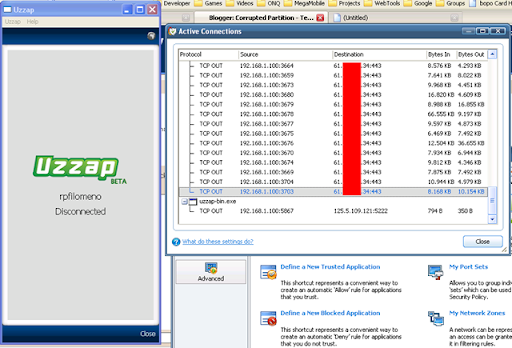
I downloaded the app and registered then my firewall alerted me that its trying to connect to an IP at port 5222.

uzzap-epic-fail

Bingo it must be a Jabber server. I finished the registration and waited for the confirmation SMS and keyed in the PIN, at first the SMS didn't arrive so I have to click Resend PIN.

The UI is very mediocre so I fired up WireShark and started to sniff the Jabber packets. I need to do this to find out my JID -- WireShark didn't fail me and confirmed that its a Jabber server; it also found my complete JID.

It seems Smart bought another toy, this time from Kolipri. Why? Maybe because they wanted to kick out Chikka for the longest time already or they got envy because Globe has such an epic failure with IMEVRYWHR before that they had to top that too.

Anyway, whatever their reason is I don't really care but its time for some experiments.

I then added my JID to Trillian (you can use any other Jabber client) as a Jabber account and used the same password during registration and it works flawlessly.

Here is the settings for use with any Jabber client:

Jabber ID (JID): your_registered_username@demo.kolipri.com
Host: 125.5.109.121
Port: 5222

After login in using Trillian, Uzzap automatically gets disconnected. It seems there is an enforced single login rule in placed. That's Ok since I don't need the ugly Uzzap client anymore!

Lesson learned? Don't spam me with ads. Haha.

UPDATE:
Here is a screen shot of my Trillian Preferences showing that this hack works!

Sunday, December 31, 2006

Txtdomain Mobile CMS

Txtdomain.com is the first true Mobile CMS in the Philippines utilizing Mobile 2.0 technology which offers instant creation and management of mobile services accessed using SMS keywords and short code combination. Check out the demo video that was recently released for non-registered users which shows how easy it is to create you own mobile service in under 30 minutes.

For inquiries please email or call 897-3377, Monday to Friday between 10 AM to 5PM


Watch on site demo of Txtdomain in wide screen format here.

Monday, December 11, 2006

SMS spamming is a crime!

US Senate passed a legislation to severly punish Pre-Texting (more commonly known as SMS Spams). It is now a federal crime to obtain a person's cell phone number without permission and use it for SMS Spamming.

I wish they would pass that same bill also here in the Philippines.

Story via www.NyTimes.com

Tuesday, November 21, 2006

My Own Mobile Service


I finally got my own Mobile Service via Txtdomain.com and it now comes with a cool widgets that you see at the right side of this page. (disclosure: I work there :D) These days, mobile technology is rapidly advancing up to the point that its almost homogenous with the Internet.

Where Web might have failed in giving us a total freedom and personal space, mobile has succeeded.

The screen shot above is from Txtdomain's web interface that allows full control in creating your own mobile service.

Sunday, October 08, 2006

Build your own meebo.. or even better!


After being dunk from an office party, i decided to sleep over at my desk rather than go home but couldnt fall asleep. So i decided i'll do some far off experiment Txtdomain once again.. i set my goal to replicating Meebo (or atleast some part of it); don't get me wrong here, I dont hate Meebo. I think it's very cool and im always using it whenever im not at the office.

To cut my work short i Googled, found Jabberd2 easy enough as my Jabber/IM server and a few more scripts downloaded to support bindings to other transport. Then i caught a snag when I tried using purely PHP and Apache to connect to Jabberd2 so i decided to go Java with Tomcat since i was already able to make a Jabber Bot earlier with JivesSoftware.

It took me a while on how to handle cross server authentication without sacrificing security, so ive settled for one time embeddable javascript to pass the data plus it is protected by a session based login. Since i freely control the passwords i made them dynamic so Txtdomain will pick a random password every time a user logs-in then change it to something else again when the user logs-out. I could have deleted the Jabber account but i wanted the users to recieve offline messages as well.

In the end it took me 15 hours to finish the experiment and embed in into our Txtdomain site. I'll try to write a howto later when i have the time, i will also try using eJabberd instead of Jabberd2.

Check out the screen shot, SMS to IM and even to GoogleTalk! Now to think of it, it does sounds more like a Chikka competitor rather than for Meebo :P

Related Links