All about Mobile, Web, Technology, Politics, Security, E-Commerce and Living in the Philippines.

Showing posts with label Hack. Show all posts

Saturday, August 08, 2009

Google Voice Hack for mobile users

Last week I unveiled the Google Voice Hack which all allows non-US users to register and call US for Free from GTalk. Today im going to share another trick how to use this hack for mobile after a reader sent me the following e-mail:

Your blog about Google Voice hacks
8:18 AM (15 hours ago)

I have a Google Voice account and live in Japan. What software hack did you find to call to the US with this? I would really like to call my grandmother since she doesn't understand things like Gtalk or Yahoo Messenger, and my cellular phone costs too much.

Thanks!

Michele (last name hidden)


Well currently Google voice supports Blackberry and Android but it goes through the native dialer so you can't use that to call for free when you're outside US. So here is the trick to bypass that:
  1. After using the Google Voice hack, use Gizmo5.com's Phone client to receive calls via SIP.
  2. Open your phone browser to www.google.com/voice/m
  3. from the site enter the US number you wish to call.
  4. It will then ring your Gizmo5.com's Phone client, answer it.
  5. Wait while it rings the US number and connects you.
  6. The US receiver doesn't need to use this hack, they will receive the call like any other ordinary local call via their mobile or land-line phone.
Take note however that this trick uses data rather than native call so depending on your phone subscription it should be lots cheaper compared to calling US as an international call. Finally if your phone supports WIFI connectivity then just find a free hot-spot and call for free!

Saturday, August 01, 2009

Google Voice Hack: FREE Outgoing Call to US

voice_logo_sm

Today I'm unveiling the most anticipated hack for Google Voice which I have shared during the 1st Google Technology Users Group Philippines (GTUG PH) meet-up.

Here are the steps:

  1. Get Gizmo account from Gizmo5.com, take note of your Gizmo SIP number.
  2. Download and install the Gizmo for windows app.
  3. Sign-up for IPkall.com number and use the following details details:
    - Account type = SIP
    - SIP phone number = Gizmo SIP number (no spaces,dash,parenthesis)
    - SIP proxy = proxy01.sipphone.com
    Note: takes about 3 days to be approved, you will receive an email
    with your new US number. This will give you already an incoming call capability but no free outgoing calls, we need Google Voice for that.
  4. Reserve Google Voice account at http://voice.google.com, it takes about 5 days to get an invite.
  5. AFTER receiving both the IPkall Number and Google Voice invite,
    Download UltraSurf from http://www.ultrareach.com/. You will need this to register for Google Voice since only US IP is allowed.
  6. Login to Gizmo5 desktop app then use UltraSurf proxy and sign-up for Google Voice account using invite link sent to your email.
  7. Use your IPkall US number when prompted by Google Voice.
  8. Confirm you have a US phone number by receiving a call on Gizmo5 app, type the security code from Google Voice site using the Gizmo5 app's dial pad. Just keep repeating to input the security code (usually 1 to 2 digits) with a short pause
    between attempts until it hangs up.
  9. Google voice will recognize the code and redirects the page to your
    dashboard.
  10. Configure Gizmo5 call forwarding at http://my.gizmo5.com settings, select
    option "If no answer on Gizmo5, ring elsewhere (Call Hunting)" and
    forward it your Gtalk account. Exit Gizmo5 desktop app.
  11. Using http://voice.google.com site call Google 411 at +18004664411, it
    will ring your Gtalk, accept and hear the tone ringing as it call the
    GOOG411 number. When you are able hear GOOG411 voice prompt then it
    means you have successfully configured Google Voice Hack and you will
    be able to make US calls for free and receive calls via GTalk.

I have not fully understood the Google Voice TOS but IMHO this hack basically fulfills all the requirements so you should be a legit user.

Feel free to send me feed backs!

Thursday, July 23, 2009

Google Voice: Philippines makes FREE calls to US

This is probably the first hack for Google Voice allowing non-US residence to own a Google Voice Number!

Yes ladies and gents; I'm here in the Philippines (well outside US) but I was able to subscribe to Google Voice, get a legit US number, accept calls and SMS plus make calls to  US number for FREE*

What does this mean? It means a "Game Over" for Telco's international call revenue, NTC's ban on VOIP and don't forget Skype's market too!

... but that's not all, I'm also able to accept calls via Google Talk for FREE! This means that Google Voice + GTalk is inevitable!

GoogleVoicePH-GameOver 
(Note: picture edited to hide private numbers)

For now I'm keeping this hack a secret and this post is just for the record that "this is" the day Google Voice has been hacked. I'm still signing up for another Google Voice account and try record the entire hack in video as well as some demo calls (too sleepy right now at 4:31AM to do it X_X).

Finally before someone else blows up; I want to clarify that when I say "hack", I didn't break in and exploit something on Google's code. This is a business model hack by finding a way to circumvent current rules and using alternative routes to acquire legitimate way to sign up for the service.

Now time to sleep, I love Google XD ! Zzzz

Thursday, February 26, 2009

I Will Hack Food - J0L1BU6 G0t H4X0R3D! (Jollibee got hacked)

I got home early today so I could attend the meeting tomorrow and as usual I got bored... and when I get bored something phun gets posted here. Hehe.

So I recently found out about this promo-game in Facebook called "Jollibee Sulit Sarap Challenge" wherein the top scorer for the week gets a P500 Gift Certificate from Jollibee (fastfood)... and it just hits me. I will hack for food! LOL

So I visited the application page and added it to my Facebook account then figured out the kung-fu behind it. As it turns out, its so bloody easy to hack -- less than a minute!

FireShot capture #1 - 'Facebook I Jollibee Sulit Sarap Challenge' - apps_facebook_com_jollibeegameapp_topScorers_php

OK First of all this is just harmless fun, I did not break any security scheme doing this.

Now I feel like a lowly script kiddy for doing this and its LAME so I won't even bother to redeem my hacked fast food. LOL.

But seriously, the guys who pitched this to Jollibee clearly wasn't thinking straight.

Guys IF I were seriously going to P4wN you I could have made my score just always above the rest and not put 73337 as a score. So take this as a free advice and better pull that game out until you fix the boboo -- but better make its good because IF I get bored again, I will come back and play to see IF you have learned the kung-fu.

Neo: I know kung fu.
Morpheus: [eyeing him, hand on chin] Show me.

PEACE. HTH.


UPDATE 2/26 - 1:33 PM

I got an email from the devs:

FROM: Jay Anthony Chiu

Good morning Mr. Filomeno!

We've read about your blog about the Jollibee Hack (link: http://corruptedpartition.blogspot.com/2009/02/i-will-hack-food-j0l1bu6-g0t-h4x0r3d.html), and we appreciate your concern. We actually have seen this when we had our internal tester hack into it, and we are currently working on a resolution for this.

But for the meantime, I hope you would be able to put down your blog entry about this matter.

We hope for your cooperation.

Thanks!

Take it down? Seriously its too late, here is my reply:

Hi Jay,

Is teamyehey = Yehey!?

I didn't realize that and would have contacted you guys straight regarding the matter, i guess i was too sleepy at 4AM in the morning to dig more about it. I could take down the post but its aggregated to 2 dozen other splogs and bots out there and it wouldn't make a difference anymore by this time. As you guys work with SEO you do realize that when the source link is taken out the, aggregating site takes the highest authority on the subject thus updates (when you guys fixed it) to the original article wont be reciprocated anymore. Such that searches to "Jollibee Hack" would show the aggregating sites as top result and not the original post with updates with the fix .

Anyway I have made sure not to disclose the exploit vector on the post and only that its possible and its just easy for my level.

Finally, im sure it would only take 15-30 mins to fix the exploit vector, let me give you guys tips.

1. Never trust user input - hash the submitted data so that if tampered the hash will invalidate it. A hash with salt plus arbitrary padding data makes it almost impossible to figure out and crack the hash.

2. Use AMF - its a native Flash communication transport, by itself its not very effective but will protect the data from prying eyes like proxies.

3. Encrypt the entire data sent - SHA1 will be good enough and very simple to implement.

Did I make sense on the reply? What do you think guys? Will a take down really help fix it or just hide the fact that it has problems without giving users warning that the system is being gamed. Surely I'm not a hypocrite enough to say I'm the only one who can do this. Send feed backs on the comment and I'll decide later this day if take a down is necessary.

Finally, my hi-score has already been taken out from the database (thank God), but I do hope they really fix it soon coz I'm getting hungry :D

Monday, January 26, 2009

Philippine mobile users can send SMS TO (almost) ANYWHERE IN THE WORLD FOR FREE* and telcos don't want you to know about it.

I'm bored! So I'm going to show you a hack on how to send SMS (and soon MMS too) for FREE* and piss off the telcos :D

This has nothing to do with this article but can you guess where this came from? :D

This hack is based on exploiting the current business models of telcos here in the Philippines (that is my night work; I hack not just servers and codes but also find exploits on business models). This is not new, its been possible since 6 years ago and the telcos didn't want you to know about it.

So don't worry, this hack is valid and will not put you at any risk. There is however a cons to this, only the first 3 160-character message is free, there is a P2.50 charge on the 4th message but the next 3 message will be free again. Somehow it works like this:

  • 1st 160 character message - free
  • 2nd 160 character message - free
  • 3rd 160 character message - free
  • 4th 160 character message - P2.50 charge
  • 5th 160 character message - free
  • 6th 160 character message - free
  • and so on...

You may also need to check if there is any additional cost on the recipient but in US its mostly bundled already with their service plan.

Now I know you are eager now to start so here goes (you bastards :D), just follow these steps (UPDATED on 02/04/09):

  1. First you must know what is the carrier of your friend at US (check the long list below).
  2. Create an email filtering and forwarding scheme using your email provider, you can use free email provider such as GMail:


    (View Full Size Video)
  3. Compose an SMS message "M2M <your@email.com> <to-mobile-number> <your message>".
  4. Send it 2948
  5. If your US friend replies you will get a message from 2948XXXXXXXX (12-digit: access number + post-fix alias)
  6. Save this number, this is the permanent number you can use to send him/her an SMS for free by just sending "<to-mobile-number> <message>". Note the M2M and is no longer needed when using this alias.
  7. You have to repeat these steps for every new number you wish to send to.

    *START RANT*

    Telcos has caught-up to the previous trick on sending directly using the <US-mobile-number>@<provider gateway> by restricting the format, but sorry telcos -- my hack will still work simply because you are ignorant about  how technology works... So you better send packing who told you otherwise -- just kidding, its good for us you keep them :))

    Anyway, you are still stuck on the stone-age by thinking that you can still control the  technology in the industry for profit and by doing so; restricts our right to fair use and right to communicate (a major violation of our right to free speech and expression!).

    *END RANT*

Now check out the list below on how to find the <gateway> per telco worldwide. Take note that MMS doesn't work yet and <to-mobile-number> is usually the 10-digit number unless specified in the list below.

Finally the message might arrive a bit slower because carriers outside US impose a QOS for non-local inbound messages.

That's it, Kung Hei Fat Choi!! Going to sleep now :D


List of Carrier Gateways

  • 7-11 Speakout (USA GSM): <number>@cingularme.com
  • Airtel (Andhra Pradesh, India): <number>@airtelap.com
  • Airtel (Karnataka, India): <number>@airtelkk.com
  • Airtel Wireless (Montana, USA): <number>@sms.airtelmontana.com
  • Alaska Communications Systems" <number>@msg.acsalaska.com
  • Alltel Wireless: <number>@message.alltel.com
  • aql: <number>@text.aql.com
  • AT&T Wireless: <number>@txt.att.net
  • AT&T: <number>@mmode.com
    (formerly AT&T, then Cingular, now AT&T Wireless - Original grandfathered rateplan customers)
  • AT&T Mobility: <number>@mms.att.net / <number>@txt.att.net / <number>@cingularme.com
    (formerly Cingular)
  • AT&T Enterprise Paging: <number>@page.att.net
  • BigRedGiant Mobile Solutions: <number>@tachyonsms.co.uk
  • Bell Mobility & Solo Mobile (Canada): <number>@txt.bell.ca / <number>@txt.bellmobility.ca
  • Boost Mobile: <number>@myboostmobile.com
  • BPL Mobile (Mumbai, India): <number>@bplmobile.com
  • Cellular One (Dobson): <number>@mobile.celloneusa.com
  • Cingular (Postpaid): <number>@cingularme.com
  • Centennial Wireless: <number>@cwemail.com
  • Cingular (GoPhone prepaid): <number>@cingularme.com (SMS)
  • Claro (Brasil): <number>@clarotorpedo.com.br
  • Claro (Nicaragua): <number>@ideasclaro-ca.com
  • Comcel: <number>@comcel.com.co
  • Cricket: <number>@mms.mycricket.com (MMS) / <number>@sms.mycricket.com (SMS)
  • CTI: <number>@sms.ctimovil.com.ar
  • Emtel (Mauritius): <number>@emtelworld.net
  • Esendex: <number>@esendex.net
  • Fido(Canada): <number>@fido.ca
  • General Communications Inc: <number>@msg.gci.net
  • Globalstar (satellite): <number>@msg.globalstarusa.com
  • Helio: <number>@myhelio.com
  • Illinois Valley Cellular: <number>@ivctext.com
  • Iridium (satellite): <number>@msg.iridium.com
  • i wireless: <number>.iws@iwspcs.net
  • Koodo Mobile (Canada): <number>@msg.koodomobile.com
  • Meteor (Ireland): <number>@sms.mymeteor.ie
  • Mero Mobile (Nepal): 977<number>@sms.spicenepal.com
  • MetroPCS: <number>@mymetropcs.com
  • Movicom: <number>@movimensaje.com.ar
  • Mobitel (Sri Lanka): <number>@sms.mobitel.lk
  • Movistar (Colombia): <number>@movistar.com.co
  • MTN (South Africa): <number>@sms.co.za
  • MTS (Canada): <number>@text.mtsmobility.com
  • Nextel (United States): <number>@messaging.nextel.com
  • Nextel (México): <number>@msgnextel.com.mx
  • Nextel (Argentina): TwoWay.11<number>@nextel.net.ar
  • Personal (Argentina): <number>@alertas.personal.com.ar (call for activation)
  • Plateau Wireless (United States): 11digit<number>@smsx.plateaugsm.com
  • Plus GSM (Poland): +48<number>@text.plusgsm.pl
  • President's Choice (Canada): <number>@mobiletxt.ca
  • Qwest: <number>@qwestmp.com
  • Rogers (Canada): <number>@pcs.rogers.com
  • SL Interactive (Australia): <number>@slinteractive.com.au
  • Sasktel (Canada): <number>@sms.sasktel.com
  • Setar Mobile email (Aruba): 297+<number>@mas.aw
  • Sprint (PCS): <number>@messaging.sprintpcs.com (SMS) / <number>@pm.sprint.com (MMS)
  • Sprint (Nextel): <number>@page.nextel.com (SMS) / <number>@messaging.nextel.com (MMS)
  • Suncom: <number>@tms.suncom.com
  • Sunrise (Switzerland): <number>@gsm.sunrise.ch
  • T-Mobile: <number>@tmomail.net
  • T-Mobile (Austria): <number>@sms.t-mobile.at
  • T-Mobile (UK): <number>@t-mobile.uk.net
  • Telus Mobility (Canada): <number>@msg.telus.com
  • Thumb Cellular: <number>@sms.thumbcellular.com
  • Tigo (Formerly Ola): <number>@sms.tigo.com.co
  • Tracfone (prepaid - direct): <number>@mmst5.tracfone.com
  • Tracfone (prepaid - indirect): <number>@cingularme.com / <number>@tmomail.net / <number>@vtext.com / <number>@email.uscc.net / <number>@message.alltel.com
  • Unicel: <number>@utext.com
  • US Cellular: <number>@email.uscc.net (SMS) / <number>@mms.uscc.net (MMS)
  • Verizon: <number>@vtext.com (SMS) / <number>@vzwpix.com (MMS)
  • Vivo (Brasil): <number>@torpedoemail.com.br
  • Virgin Mobile (Canada): <number>@vmobile.ca
  • Virgin Mobile (USA): <number>@vmobl.com
  • Vodacom(South Africa): <number>@voda.co.za
  • YCC: <number>@sms.ycc.ru
  • MobiPCS (Hawaii only): <number>@mobipcs.net

Monday, July 07, 2008

UZZAP Hack

I have received a MMS blast from Smart announcing its new service Uzzap -- although I have opted out already many times to these alerts!

It's time to teach these folks some lesson.

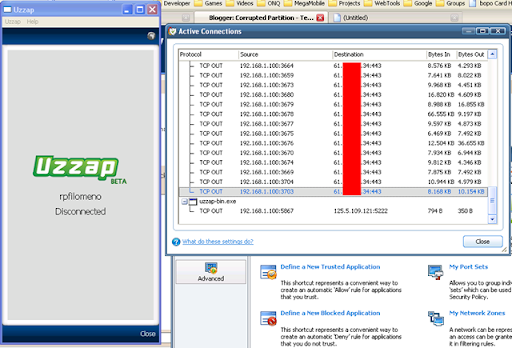
I downloaded the app and registered then my firewall alerted me that its trying to connect to an IP at port 5222.

uzzap-epic-fail

Bingo it must be a Jabber server. I finished the registration and waited for the confirmation SMS and keyed in the PIN, at first the SMS didn't arrive so I have to click Resend PIN.

The UI is very mediocre so I fired up WireShark and started to sniff the Jabber packets. I need to do this to find out my JID -- WireShark didn't fail me and confirmed that its a Jabber server; it also found my complete JID.

It seems Smart bought another toy, this time from Kolipri. Why? Maybe because they wanted to kick out Chikka for the longest time already or they got envy because Globe has such an epic failure with IMEVRYWHR before that they had to top that too.

Anyway, whatever their reason is I don't really care but its time for some experiments.

I then added my JID to Trillian (you can use any other Jabber client) as a Jabber account and used the same password during registration and it works flawlessly.

Here is the settings for use with any Jabber client:

Jabber ID (JID): your_registered_username@demo.kolipri.com
Host: 125.5.109.121
Port: 5222

After login in using Trillian, Uzzap automatically gets disconnected. It seems there is an enforced single login rule in placed. That's Ok since I don't need the ugly Uzzap client anymore!

Lesson learned? Don't spam me with ads. Haha.

UPDATE:
Here is a screen shot of my Trillian Preferences showing that this hack works!

Saturday, August 18, 2007

Hacked IPhone with working SIM

...And the world has triumphed against the monopolist.

IPhone is now officially hacked with thanks to Vladimir_CDI,ozbimmer. Hacked IPhone will now work with any carriers which means the price tag will sky rocket again which is good for Apple but this means AT&T will no longer monopolize the IPhone user market and people would probably switch back to better providers -- hah, it told you so AT&T, Apple got you PWND for agreeing with their marketing scheme.

Ok, I know you didn't really read my ramblings and just wants the hack so just go to: http://tinyurl.com/ysev9j

WARNING: The hack is for the uber-techie; I'm also currently trying to get hold of the SIM readers at the moment -- I will have to wait for someone to buy it for me next month overseas.

I'm going to post a copy of the How-To here with alternate links to downloads just in case it gets taken down, but it's BEST to get the latest technique from hackint0sh.org.


U will need::

1. an iPhone
2. SIM Reader/Writer (Infinity USB Unlimited, Dynamite Programer(I used this) ,etc...)
3. SilverCard
4. Your SIM card (It must be a V1 ,U must be able to get Ki number)
5. Download
- http://tinyurl.com/22pmnc (alt site: http://tinyurl.com/25p5e3)
- http://tinyurl.com/28s9gn (alt site: http://tinyurl.com/3ab7qt)


1. ::Getting IMSI,ICCID & Ki number from your SIMs::

Step 1 - Your(V1)SIM

1. Put your carrier SIM card in programer
2. Run Woronscan
3. Click on "Tasks" tab then on "IMSI select" u will get a IMSI number, write it down.
4. Click on "Task" tab then on "ICC select" u will get a ICCID number, write it down.
5. Click on "Tasks" tab then on "Ki search", in pop-up window just click "Search", and wait,Ki extraction has began.(I was waiting for mine 40 min ) When u get it, write it down.

Step 2 - Getting IMSI from AT&T SIM card which came with an iPhone

1. Put your AT&T SIM card in programer
2. Click on "Tasks" then on "IMSI select" u will get a IMSI number, write it down.
3. Close Woronscan
4. Remove SIM from programer

Now U have all "data" to make SuperSim.


::Making SuperSim::

1. Download & extract - http://tinyurl.com/364l4g (alt site: http://tinyurl.com/3cpfo7)
1.a Put your Silvercard in programer
2. Run Sim-Emu 6.01 Configurator v2.1
3. Click on Configure tab
4. Click "Read from disk" button
5. Browse to your downloaded Flash&EEPROM files, first double click on SIM_EMU_6.01_iphone_u1.HEX and then double click on SIM_EMU_6.01_iphone_u1_EP.HEX, now they are loaded,positions 0 and 9 are red colored,thats fine.

6. In position 0 , type in data which u got from your carrier SIM with Woronscan - IMSI,Ki & ICCID!
For ADN/SMS/FDN# type 161, 15, 4, for SMS Centre type in your carrier SMS center number.

7. Now select position "9", here type IMSI from AT&T SIM card ,and PIN1 ,PUK1 same like in position "0" ,NOTHING ELSE!
8. In "Config mode" check "Files" circle check button
9. Click on "Write to disk" button,u'll be asked to save new created SuperSim Flash&Eeprom files,Save it!
10. Write those NEW created Flash&Eeprom files on Silvercard with your programer software!
11. Cut the SIM - http://tinyurl.com/yvku6u


2. ::Making your iPhone SuperSim compatible::

Step 1
MAC - http://tinyurl.com/ysxufc
WIN - http://tinyurl.com/256fj7

Step 2
WINDOWS users - For already "fake activated" iPhones ,put the AT&T SIM that it came with iPhone in it or deactivation in step 12. will not work!In "Step 15" when U are filling in fileds ,for ICCID use your carrier SIM ICCID not AT&Ts! When u download a "custom activator v0.2" DO NOT PROCCED to Step 16! At this point remove AT&T SIM card from iPhone(still connected to computer),put in your SuperSim AND THEN procced to Step 16.!

MAC users - In step 18. type your carriers SIM ICCID where needed

U will get Activated iPhone with your SuperSim! iPhone will say "Locked SIM", Don't panic!, its only a PIN lock, tap unlock---type PIN 1111. U can disable or change PIN later in Settings--Phone--SimPin.

MAC - http://tinyurl.com/2dqvlp
WIN - http://tinyurl.com/28vfr3

Tuesday, January 02, 2007

Happy New Year Google: Gmail Hacks posted on Digg!

Hacker's gave Google a new year's gift: A ways to steal all your Gmail contacts by just visiting a site, anysite for that matter. By the time im writing this, 1628 people dugg the article on digg plus they posted the code on the comment page.

I tried it myself and it only took me 10 minutes to code a Gmail address book slurper using PHP, this code is released for educational purposes only. You may try out if your Gmail is vulnerable here(fixed).

Maybe this is the end of Google peaceful reign and join the likes of Microsoft who battles endless wave of hackers trying to find the next vulnerability.

UPDATE: 3:53AM +8:00

Guys if your using the test site please create a dummy account and add some useless email address on the contact list. Although I'm not harvesting your account (so your safe if you trust me) but my hosting just called saying my access_logs has bloated. So please, create a dummy account first and add Bush to the contact list before testing. I'm adding more tests scripts using other sources of the contact list data such as Google notepad and Google groups.
Thanks.

UPDATE 7:31PM +8:00

I'm checking in to report that the hack has been closed thanks to the cult followers of Gmail who were relentless in finding all the bugs. I'm not sure what time it was fixed since I wasn't able to stay awake to test regularly via the test site, thanks to Aileen Apolo's reply (to my mass email warning) i woke up to update this post right away. Kudos to Google team, i think they had to skip some needed holiday break just to fix this hack as fast as possible lastly kudos the rest of the blogosphere and diggers who searched and posted the hack. IMHO if these guys who initially found the hack didn't come forward with the report (they didn't withheld the hack and use it for their own profit), lots of accounts could have been compromised.

Saturday, December 30, 2006

Beware of wire tapped phones

As more people uses mobile phones as alternative wallets compared to credit cards, the more we must be aware about and protected against mobile data theft. There are actually lots of mobile data theft that has been reported on the news especially with local celebrities where they allegedly had their mobile phones repaired but ended up having their private pictures from their phone published on the Internet.


This brings me to the site endoacustica.com who specializes on spy equipments, one of their hot selling items are the Spy Phones -- a normal looking phone (latest models are available) but it was reprogrammed (firmware + chip hack) to allow certain number to call the phone without ringing, it even works while the phone is off! This allow the caller to eaves drop using the phone without the user being aware of, it also allows interception of SMS (forwarding). Now imagine theives using this type of technology, given the right motives and person to attack. These spy phones may intercept starting anything from private business negotiations up to bank account details.

Tuesday, December 12, 2006

How to hack using MySpace, Full Video


I love instructional videos, this wouldn't be totally possible without Flash streaming technology. Check out this video of a real hack using Metasploit Framework's WMF exploit and good old Flash to sneak in a virus into a vulnerable MySpace user.

I think im going to make the same video but using Blogger.com... Just right now im actually rooting you..

Kiddin :)

Saturday, November 18, 2006

Enabling Microsoft Remote Desktop for Windows XP Pro SP2

Recently I have been working remotely most of the time so my usual Tight VNC wasn't good enough anymore, so I decided to fire up MS Terminal Service. I know there are a couple of dangers involved opening up my PC up for access but I guess I just need to monitor it closely from now on.

Enabling MSTS wasn't easy, primarily because with Windows SP2 has totaly disabled it without any option of having it turned back on! (shame). MS did provide a way to enable it again but it doesn't work, there's also another hack to enable it but IMHO its too barbaric, it involves loging into safe mode and replacing some critical files and hopes it work. Therefore i come up with a more elagant approach.


  1. Disable MSTS if its running. My Computer > Properties > Remote > Allow users to connect remotely to this computer (disable checkbox)

  2. Download SP1 version of termsrv.dll and save it to your Windows folder (C:\Windows).

  3. Run the regisry editor (Regedit.exe)

  4. Edit key: HKEY_LOCAL_MACHINE\System\CurrentControlSet\Services
    \Mup\DisableDFS and set its value to 0

  5. Edit key: HKEY_LOCAL_MACHINE\System\CurrentControlSet\Services
    \TerminalService\Parameters\ServiceDll and set its value to %SystemRoot%\termsrv.dll

  6. Re-enable MSTS. My Computer > Properties > Remote > Allow users to connect remotely to this computer (enable checkbox). Add up some users also that would be allowed remote access.

  7. Reboot your PC.

  8. Test your MSTS connection and make sure that the firewall is configured to allow accress via TCP/UDP port 3389

Related Links